OAuth variables
Set this callback urls to redirect after the login succeeds
API_AUTH=https://production-api.globalforestwatch.org
API_AUTH_CALLBACK_URL=https://production-api.globalforestwatch.org/auth/success
Google oAuth
To set up Google oAuth you'll need the following env vars:
LOGIN_GOOGLE_CLIENT_ID_ANDROID=
LOGIN_REDIRECT_SCHEMA_ANDROID=

LOGIN_GOOGLE_CLIENT_ID_IOS=
LOGIN_REDIRECT_SCHEMA_IOS=
To generate this values follow the next steps:
- Log into Google API Console and create a project.
- Open the credentials section and inside the create credentials dropdown select:
oAuth client-id. - You'll need to select a type: Android or iOS (create one for each platform if you wish to support both of them).
- For iOS copy the client-id and the iOS URL scheme.
- For Android copy the client-id and use the chosen package name as redirect url.
Facebook SDK oAuth
To set up Facebook authentication you'll need the following env vars:
LOGIN_FACEBOOK_APP_ID=
LOGIN_FACEBOOK_PROTOCOL_SCHEME=
In order to generate this values follow the next steps:
- Create a Facebook Developer Account (a regular facebook account is required).
- Once you have set your FB developer account, add a new Facebook application.
- Afterwards, inside the products menu of your app select Facebook Login.
- Head over to
Facebook Login/Quickstarton the left sidebar. - Select Android (there's no need to download or modify any code this has already been done). Fill the following fields:
- Package Name.
- Default Activity Class Name.
- Key Hashes, it's really important that you generate a dev hash for every environment, and a release hash for production.
- In step 6 you'll find the env var values that you need (should be the same in Android and iOS).
- Select Apple (same case, no need to add any code). Fill the following fields:
- Bundle ID
- In step 4 you'll find the env var values that you need (should be the same in Android and iOS).
To setup facebook authentication from scratch you'll need to follow the instructions in these links:
Android
- Follow all steps in
Facebook Login/Quickstart/Android. - Follow the instructions here
The previously linked docs aren't 100% accurate, you'll need to add this to
MainApplication.javainstead:@Override public void onCreate() { super.onCreate(); setActivityCallbacks(new ActivityCallbacks() { @Override public void onActivityResult(int requestCode, int resultCode, Intent data) { mCallbackManager.onActivityResult(requestCode, resultCode, data); } }); }
iOS
- Follow steps 1-5 in
Facebook Login/Quickstart/iOS. - In step 4, replace the app id and CFBundleURLSchemes with
__RN_CONFIG_LOGIN_FACEBOOK_APP_IDand__RN_CONFIG_LOGIN_FACEBOOK_PROTOCOL_SCHEME - Running the following will install the Facebook SDK
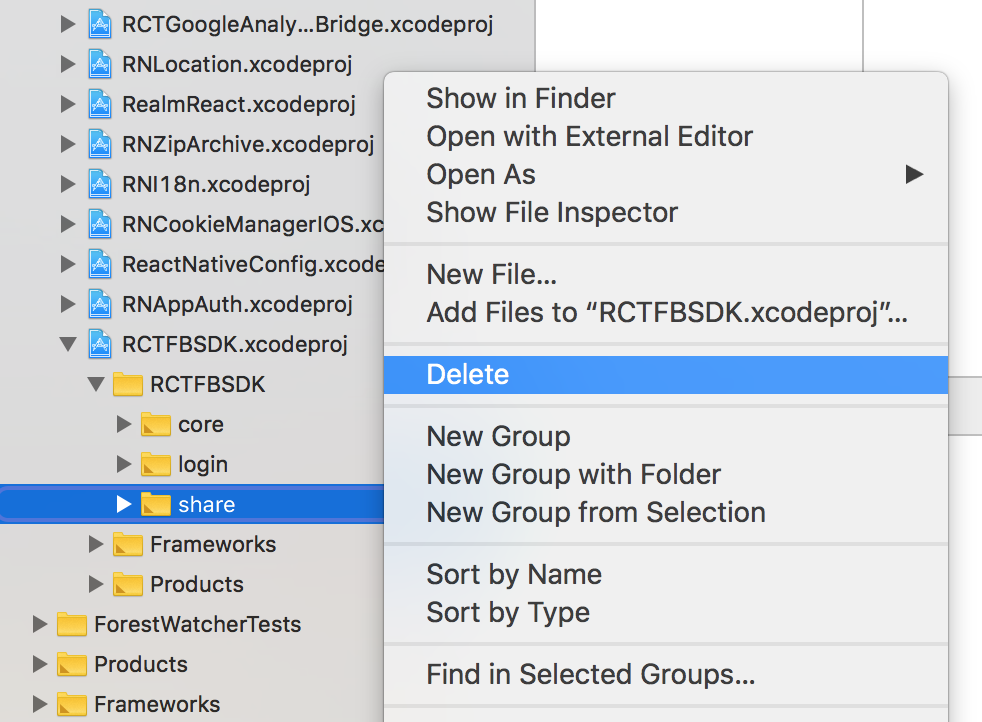
# install node modules npm i # install pods (cd ios; pod install;) # link sdk to project react-native link react-native-fbsdk - If you get an "FBSDKShareKit/FBSDKShareKit.h file not found" error, the easiest way out is removing the
sharefolder fromlibraries/FBSDK/folder in xcode as the following image: